Extension Methods (Simple example in C# language)

Monday, May 18, 2020

Hi Friends,

After a long time I am writing something on this blog. As you can see that my first priority is to deliver my thought on very simple way which will help you to clear the concept. Today we will understand that what is the basic use of Extension Methods and how we create them. 

Extension methods are used to add methods in existing classes (a custom class or framework class) without changing them or inheriting them as a new class. Extension method need to be static and class in which you define extension method should also be an static class.

For example in order to convert string into integer I don't want to use Convert.ToInt32() method as it is not much handy for a programmer. So, I need to create my own method which can be used in any string variable and it looks like the method is available in existing "string" class provided by .net framework. I will create a new static class named "Extension" then create an static method in it named ToInt() which will be used in any string type to convert its value into integer type.

I am using IDE - Microsoft Visual Studio 2019.

1. Open Visual Studio.
2. File > New > Project.
3. Create New Project by selecting "Visual C#"  and selecting "Console App (.Net Framework) and click "OK" button.

New Project


4. Add a new class by right clicking on project > Add > Class.


5. Name it anything for example "Extension" and click "Add" button.

Extension class

6. Extension class should be static. 
7. Add following method in this class:

public static int ToInt(this string Value)
{
  int.TryParse(Value, out int result);
  return result;
}

it will look like this: (note that the class should be static).

Extension class with code

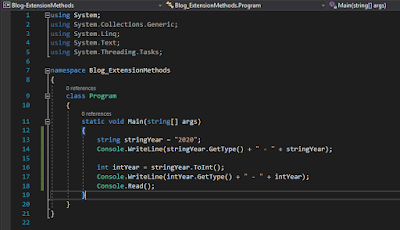
8. Then add following code into Main() method of Program class:

string stringYear = "2020";
Console.WriteLine(stringYear.GetType() + " - " + stringYear);

int intYear = stringYear.ToInt();
Console.WriteLine(intYear.GetType() + " - " + intYear);
Console.Read();

It will look like this:

Program class with code


9. Press F5 to execute the program, you will see the following output:


Which shows that the code is working fine and now with the help of extension method, you can use our newly created ToInt() method by just pressing "." dot after any string variable.

There are a lot more complex examples than this but this was the simplest example by which I can demonstrate you the basic use of extension methods. 

Please feel free to ask anything regarding this on my provided contact details.

**************************LINKS******************************

I have created a new better blog:

My Youtube channel:

**************************LINKS******************************

Thanks
Have a nice day!

How To Read XML Data into DataSet by Using C# .NET

Sunday, June 3, 2012

During my past experience i have worked on complex xml logics and learned a lot of depth knowledge that how xml data can be integrated into Dot Net application. So, i want to share a very basic knowledge about xml integration.

The first step to integrate xml is to Read XML file and get data from it, so that the existing application can work on that data. I am sharing a basic tutorial which will guide you to start working on xml by showing you how to read data from it.


I tried to create a simple User Interface. (isn't it) :)


By clicking on Browse button, a file dialogue will open just select an xml file (Note: this dialogue will only allow you to select *.xml files) and i will show you that how this useful feature can be utilised in our application to filter files in OpenFileDialog control.


When you select an xml file, this simple application will open this xml into the below Data Grid View Control (Like this):


The very simple code behind of this application is following:


using System;
using System.Collections.Generic;
using System.ComponentModel;
using System.Data;
using System.Drawing;
using System.Text;
using System.Windows.Forms;


namespace XmlViewer
{
    public partial class Form1 : Form
    {
        public Form1()
        {
            InitializeComponent();
        }


        private void btnBrowse_Click(object sender, EventArgs e)
        {
            try
            {
                ShowXmlData();
            }
            catch (Exception ex)
            {
                MessageBox.Show(ex.Message);
            }
        }


        private void ShowXmlData()
        {
            //IT WILL SHOW THE DIALOG BOX FOR BROWSING XML FILE
            //AND SAVING THEN SHOW IT TO TEXTBOX
            openFileDialog1.ShowDialog();
            txtFilePath.Text = openFileDialog1.FileName;


            if (ValidateFileName(txtFilePath.Text))
            {
                //IT WILL READ DATA FROM SELECTED XML
                //AND SHOW IT TO DATA GRID VIEW CONTROL
                DataSet ds = new DataSet();
                ds.ReadXml(txtFilePath.Text);
                dgvXmlData.DataSource = ds.Tables[0];
            }
            else
            {
                throw new Exception("Invalid Data");
            }
        }


        private bool ValidateFileName(string fileName)
        {
            //YOU CAN WRITE YOUR OWN LOGIC HERE
            //TO FILTER FURTHER


            if (fileName != "")
            {
                return true;
            }
            else
            {
                return false;
            }
        }
    }
}

How to restrict OpenFileDialog for *.xml files:


  1. Select OpenFileDialog from Form and View the Properties.
  2. Select "Filter" field.
  3. Type "xml files|*.xml".
You can use this option to filter any type of file e.g. (*.txt, *.doc, *.wav etc.).

Hope this post if useful for you, If you have any question or suggestion then please contact me.

**************************LINKS******************************

I have created a new better blog:

My Youtube channel:

**************************LINKS******************************

Constructor Sequence

Friday, May 27, 2011

This sample code will ease your understanding about constructor that when constructor is called.

using System;
using System.Collections.Generic;
using System.Linq;
using System.Text;


namespace ConstructorSequence
{
    class One
    {
        public One()
        {
            Console.WriteLine("Constructor of class One");
        }


        static void Main(string[] args)
        {
            Console.WriteLine("Begin Main Method");
            Two t = new Two();
            Console.WriteLine("End Main Method");
            Console.Read();
        }
    }


    class Two : One
    {
        public Two()
        {
            Console.WriteLine("Constructor of class Two");
        }
    }
}

Output will be:


As you can observed that:
  1. First, Main() method will be run and according to first line of this method, result will be "Begin Main Method".
  2. Second line of Main() method will going to create object of Class Two by the statement "Two t = new Two();".
  3. Remember, whenever new object has going to create the following three things will be done:
    1. Constructor of the class for which an object creation is requested will called.
    2. Memory space will be consumed to store that object.
    3. Return the reference of that object to do any thing in future with this object.
  4. As per above knowledge base, the constructor of class Two will be called and again Remember one thing that before going into the body of called constructor while creating object there is one thing which is implicitly defined i.e. "Calling of Base/Parent Class constructor". This is called containment.
  5. So, before going to the line "Console.WriteLine("Constructor of class Two");" constructor of Class One will be called and which resulted "Constructor of class One".
  6. After this, actual code of Class Two's constructor will be run and resulted "Constructor of class Two".
  7. Now above mentioned three steps for creating object has been performed and its time to leave the line "Two t = new Two();". So, next printed line will be "End Main Method".
If you have any question regarding this flow contact me i will try my level best to help you.

**************************LINKS******************************

I have created a new better blog:

My Youtube channel:

**************************LINKS******************************

Method Overloading from Inherited Class

Method Overloading from Inherited Class

Method overloading is one of the best essence of Object Oriented Programming which made this dish very tasty for Programmers. And this is going to help you for making your overloading concept very clear if you have a confusion about overloading in inheritance.

This is very basic example but hopefully it will going to help you to understand the concept of overloading of a parent class method in child class.

using System;
using System.Collections.Generic;
using System.Linq;
using System.Text;

namespace Overloading
{
    class One
    {
        static void Main(string[] args)
        {
            Console.WriteLine("Begin Main Method");
            Two t = new Two();
            t.overload();
            t.overload(0);
            Console.WriteLine("End Main Method");
            Console.Read();
        }

        public void overload()
        {
            Console.WriteLine("Method of class One");
        }
    }

    class Two : One
    {
        public void overload(int number)
        {
            Console.WriteLine("Method of class Two");
        }
    }
}

Output will be:

If you found this post helpful or it can be more helpful by adding something else, so your response will be appreciated. Help me to help you.

**************************LINKS******************************

I have created a new better blog:

My Youtube channel:

**************************LINKS******************************

Efficiency means

Friday, October 22, 2010

“Efficiency is doing things right; effectiveness is doing the right things.”  

[by Peter F. Drucker]
Are you following this?

Check whether date is valid or not

Tuesday, June 29, 2010

using System;
using System.Data;
using System.Configuration;
using System.Collections;
using System.Web;
using System.Web.Security;
using System.Web.UI;
using System.Web.UI.WebControls;
using System.Web.UI.WebControls.WebParts;
using System.Web.UI.HtmlControls;

public partial class ApplyNow : System.Web.UI.Page
{
    private String dob;

protected void btn_applyNow_Click(object sender, EventArgs e)
    {
        if (getDob())
        {
            if (isAvailable(txt_emailAddress.Text))
                insertStudent();

            else
                lbl_error.Text = "Email already exists";
        }

        else
        {
            lbl_error.Text = "Please enter valid date";
        }
    }

private bool getDob()
    {
        dob = ddl_month.SelectedValue + " " + ddl_day.SelectedValue + ", " + 
        ddl_year.SelectedValue;

        try
        {
            DateTime.Parse(dob);
            return true;
        }

        catch
        {
            return false;
        }
    }

 private void insertStudent()
    {
         //coding    
    }
 }

**************************LINKS******************************

I have created a new better blog:

My Youtube channel:

**************************LINKS******************************

C# Dynamic DropDownList of Year

Thursday, June 24, 2010

private void fillDropdown()
    {
        int year = DateTime.Now.Year;
        year -= 1;

        for (int i = 0; i <= 100; i++)
        {
            ddl_year.Items.Add(year.ToString());
            year--;
        }
    }


**************************LINKS******************************

I have created a new better blog:

My Youtube channel:

**************************LINKS******************************

Get Internal IP of machine in C#

Saturday, June 5, 2010

//other related namespaces
using System.Net;

//this is example class, you can code it in your own way
public class getIP : System.Web.UI.Page
{
     //other related coding
     IPHostEntry IPHost = Dns.GetHostEntry(Dns.GetHostName());
     String ip = IPHost.AddressList[0].ToString();
}

**************************LINKS******************************

I have created a new better blog:

My Youtube channel:

**************************LINKS******************************

SQL Server: Insert records from .txt file

Thursday, June 3, 2010


CREATE TABLE geoip (
  start_ip CHAR(15) NOT NULL,
  end_ip CHAR(15) NOT NULL,
  start_long INT NOT NULL,
  end_long INT NOT NULL,
  country_code CHAR(2) NOT NULL,
  country_name VARCHAR(50) NOT NULL);


BULK INSERT geoip
 FROM 'd:\geoip.txt'
  WITH
  (
      FIELDTERMINATOR = ',',
      ROWTERMINATOR = '\n'
  )


Download 'geoip.txt' here

**************************LINKS******************************

I have created a new better blog:

My Youtube channel:

**************************LINKS******************************

Using the Dynamic Keyword in C# 4.0

Wednesday, May 12, 2010

C# 4 provides a new dynamic keyword that enables dynamic typing in what has traditionally been a strongly typed language. 

According to Dino Esposito's Article:

Dino Esposito is the author of the upcoming “Programming ASP.NET MVC” from Microsoft Press and coauthor of “Microsoft .NET: Architecting Applications for the Enterprise” (Microsoft Press, 2008). Esposito, who is based in Italy, is a frequent speaker at industry events worldwide. You can join his blog at weblogs.asp.net/despos.

Using the Dynamic Keyword in C# 4.0

Dino Esposito

Dino EspositoThe introduction of static type checking represented an  important milestone in the history of programming languages. In the 1970s, languages such as Pascal and C started enforcing static types and strong type checking. With static type checking, the compiler will produce an error for any call that fails to pass a method argument of the appropriate type. Likewise, you should expect a compiler error if you attempt to call a missing method on a type instance.
Other languages that push forward the opposite approach—dynamic type checking—have come along over the years. Dynamic type checking contradicts the idea that the type of a variable has to be statically determined at compile time and can never change while the variable is in scope. Note, however, that dynamic type checking doesn’t confer wholesale freedom to mix types, pretending they’re the same. For example, even with dynamic type checking, you still can’t add a Boolean value to an integer. The difference with dynamic type checking is that the check occurs when the program executes rather than when it compiles.

Statically Typed or Dynamically Typed

Visual Studio 2010 and C# 4.0 provide a new keyword, dynamic, that enables dynamic typing in what has traditionally been a statically typed language. Before diving into the dynamic aspects of C# 4.0, though, we need to get some basic terminology down.
Let’s define a variable as a storage location that’s restricted to values of a particular type. Next, let’s specify four fundamental properties of a statically typed language:
  • Every expression is of a type known at compile time.
  • Variables are restricted to a type known at compile time.
  • The compiler guarantees that type restrictions on assignments of expressions into variables meet the restrictions on the variables.
  • Semantic analysis tasks, such as overload resolution, occur at compile time and the results are baked into the assembly.
A dynamic language has the opposite properties. Not every expression is of a known type at compile time, nor is every variable. Storage restrictions, if any, are checked at run time and ignored at compile time. Semantic analysis occurs only at run time.
A statically typed language does let you make some operations dynamic. The cast operator exists so you can attempt a type conversion as a runtime operation. The conversion is part of the program code, and you can summarize the semantic expressed by the cast operator as “dynamically check the validity of this conversion at run time.”
However, concerning attributes such as dynamic and static (or perhaps strong and weak): Today they’re better applied to individual features of a programming language than to the language as a whole.
Let’s briefly consider Python and PHP. Both are dynamic languages, let you use variables, and allow the runtime environment to figure out the actual type stored in it. But with PHP you can store, say, integers and strings in the same variable in the same scope. In this regard, PHP (like JavaScript) is a weakly typed, dynamic language.
On the other hand, Python gives you only one chance to set the type of a variable, which makes it more strongly typed. You can dynamically assign the type to a variable and have the runtime infer it from the assigned value. After that, though, you’re not allowed to store any value of an inappropriate type in that variable.

Dynamic Types in C#

C# 4.0 has features that make it both dynamic and static, as well as both weakly and strongly typed. Though born as a statically typed language, C# becomes dynamically typed in any context in which you use the dynamic keyword, such as this:

dynamic number = 10;
Console.WriteLine(number);

And because dynamic is a contextual keyword, not a reserved one, this still holds if you have existing variables or methods named dynamic.
Note that C# 4.0 doesn’t force you to use dynamic, in the same way that C# 3.0 didn’t force you to use var, lambdas or object initializers. C# 4.0 provides the new dynamic keyword specifically to make a few well-known scenarios easier to deal with. The language remains essentially statically typed, even though it has added the ability to interact in a more effective way with dynamic objects.
Why would you want to use a dynamic object? First, you may not know the type of the object you’re dealing with. You may have clues but not the certainty to statically type a given variable—which is just what happens in many common situations, such as when you work with COM objects, or when you use reflection to grab instances. In this context, the dynamic keyword makes some situations less painful to deal with. Code written with dynamic is easier to read and write, making for an application that’s easier to understand and maintain.
Second, your object may have an inherently changing nature. You may be working with objects created in dynamic programming environments such as IronPython and IronRuby. But you can also use this functionality with HTML DOM objects (subject to expando properties) and the Microsoft .NET Framework 4 objects specifically created to have dynamic natures.

Using dynamic

It’s important to understand the concept that in the C# type system, dynamic is a type. It has a very special meaning, but it’s definitely a type and it’s important to treat it as such. You can indicate dynamic as the type of a variable you declare, the type of items in a collection or the return value of a method. You can also use dynamic as the type of a method parameter. Conversely, you can’t use dynamic with the typeof operator and you can’t use it as the base type of a class.
The following code shows how to declare a dynamic variable in the body of a method:

public void Execute()  { 
  dynamic calc = GetCalculator();
  int result = calc.Sum(1, 1);
}

If you know enough about the type of the object being returned by the GetCalculator method, you can declare the variable calc of that type, or you can declare the variable as var, letting the compiler figure out the exact details. But using var or an explicit static type would require you to be certain that a method Sum exists on the contract exposed by the type GetCalculator returns. If the method doesn’t exist, you get a compiler error.
With dynamic, you delay any decision about the correctness of the expression at execution time. The code compiles and is  resolved at run time as long as a method Sum is available on the type stored in the variable calc.
You can also use the keyword to define a property on a class. In doing so, you can decorate the member with any visibility modifier you like, such as public, protected, and even static.
Figure 1 shows the versatility of the dynamic keyword. In the main program I have a dynamic variable instantiated with the return value of a function call. That would be no big deal if it weren’t for the fact that the function receives and returns a dynamic object. It’s interesting to see what happens when, as in the example, you pass a number, then try to double it within the function.
Figure 1 Using dynamic in the Signature of a Function

class Program {
  static void Main(string[] args) {
    // The dynamic variable gets the return 
    // value of a function call and outputs it.
    dynamic x = DoubleIt(2);
    Console.WriteLine(x);

    // Stop and wait
    Console.WriteLine(“Press any key”);
    Console.ReadLine();
  }

  // The function receives and returns a dynamic object 
  private static dynamic DoubleIt(dynamic p) {
    // Attempt to "double" the argument whatever 
    // that happens to produce
    
    return p + p;
  }
}

If you feed in a value of 2 and try this code, you receive a value of 4. If you feed in 2 as a string, you’ll get 22 instead. Within the function, the + operator is resolved dynamically based on the run time type of the operands. If you change the type to System.Object, you get a compile error, because the + operator isn’t defined on System.Object. The dynamic keyword enables scenarios that weren’t possible without it.

dynamic vs. System.Object

Until the .NET Framework 4, having a method return different types according to different conditions was possible only by resorting to a common base class. You’ve probably solved this problem by resorting to System.Object. A function that returns System.Object makes available to the caller an instance that can be cast to nearly anything. So how is using dynamic better than using System.Object?
In C# 4, the actual type behind the variable that’s declared dynamic is resolved at run time, and the compiler simply assumes that the object in a variable declared dynamic just supports any operations. This means you can really write code that calls a method on the object you expect to be there at run time, as illustrated here:

dynamic p = GetSomeReturnValue();
p.DoSomething();

In C# 4.0, the compiler won’t complain about that code. The analogous code using System.Object won’t compile and requires some hacks on your own—reflection or adventurous casting—in order to work.

var vs. dynamic

The keywords var and dynamic are only apparently similar. Var indicates that the type of the variable has to be set to the compile-time type of the initializer.
But dynamic means that the type of the variable is the dynamic type as available in C# 4.0. In the end, dynamic and var have quite opposite meanings. Var is about reinforcing and improving static typing. It aims to ensure that the type of a variable is inferred by the compiler looking at the exact type being returned by the initializer.
The keyword dynamic is about avoiding static typing altogether. When used in a variable declaration, dynamic instructs the compiler to stop working out the type of the variable at all. The type has to be intended as the type it happens to have at run time. With var, your code is as statically typed as it would have been had you opted for the classic approach of using explicit types in a variable declaration.
Another difference between the two keywords is that var can only appear within a local variable declaration. You can’t use var to define a property on a class, nor can you use it to specify the return value or a parameter of a function.
As a developer, you use the dynamic keyword with variables expected to contain objects of uncertain type such as objects returned from a COM or DOM API; obtained from a dynamic language (IronRuby, for example); from reflection; from objects built dynamically in C# 4.0 using the new expand capabilities.
The dynamic type doesn’t bypass type checks, though. It only moves them all to run time. If type incompatibilities are discovered at run time, then exceptions are thrown.

Link of this Article:
http://msdn.microsoft.com/en-us/magazine/ee336309.aspx

**************************LINKS******************************

I have created a new better blog:

My Youtube channel:

**************************LINKS******************************


Swap two variables without create any third temp variable

Wednesday, April 14, 2010

            int a = 2;
            int b = 3;
           
            a = b + a;         // a is 5
            b = a - b;         // now b is 2
            a = a - b;         // now a is 3

            Console.Write("a = ");
            Console.WriteLine(a);
            Console.Write("b = ");
            Console.WriteLine(b);
            Console.ReadLine();


**************************LINKS******************************

I have created a new better blog:

My Youtube channel:

**************************LINKS******************************